
VI Makeover Edition - Part 1
For a long time, I've been meaning to do a series of posts I call the "VI Makeover Edition" where we take a VI front panel from "drab" to "fab!" :-)
I helped "spiffy up" a VI for an NI Week keynote demo last year. It is a graphic equalizer powered by LabVIEW MathScript. You can watch the demo video on ni.com.
The goal was simply to make the VI look better on the big screen, and make it easier to see the operation of the controls from the back of the room.
The original VI looked something like this:
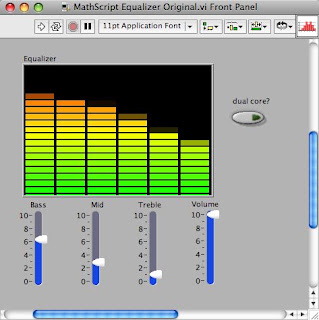
And the final VI looked something like this:
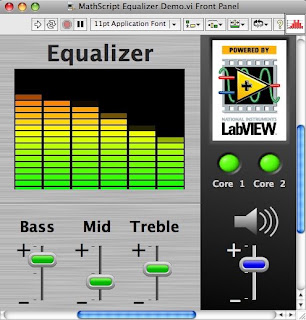
Some of the tips and tricks I plan to cover include:
I helped "spiffy up" a VI for an NI Week keynote demo last year. It is a graphic equalizer powered by LabVIEW MathScript. You can watch the demo video on ni.com.
The goal was simply to make the VI look better on the big screen, and make it easier to see the operation of the controls from the back of the room.
The original VI looked something like this:

And the final VI looked something like this:

Some of the tips and tricks I plan to cover include:
- VI panel wallpaper
- Background images and locking
- Customizing the parts of a slider control
- Adding decorations to controls
- Using transparent color
- Gradients and graphics
- Grouping and alignment
Labels: user_interface
posted by Christina at
7:48 PM


6 Comments:
Wow, looks great!
Please share the controls.
The LabVIEW community really needs nice controls.
Wow. Very impressive. I was wondering if you could also share some resources or basic ideas on UI design and layout?
For example, just throwing down controls and indicators and aligning them doesn't always look great. On the other hand Apple interfaces are so nice to use and there must be certain subtle things that they do to make them look that good and organized.
Is there a style document that describes the standard alignment/layout practices for a GUI?
I'm glad you are covering the subject of custom looking controls :)
I have project scheduled later this spring which will involve some custom look controls (i.e. new graphics for LED's, Toggle Switches, etc.)
I'm wondering which type of control set should I start from?
Jonas - Thanks! I will share the VI panel, but the slider controls are basically just classic sliders with the thumb image replaced. You can find the thumb images I made for this project in my image archive. A future blog post will go through the customization step-by-step.
Dan - Thanks! I will share the basics of UI design and layout in a future post, but I'm not going to be able to compete with the visual designers at Apple! A few basic principles can go a long way, but if you need something to look really good, you need to invest in hiring some pros. (Note that I am not such a pro. I have a lot of experience with UI design, but I am a software engineer, not a graphic designer). There are also many good books out there on UI design, and style guidelines for operating system designs (such as for Vista or Mac OS).
Markusius - I advise you to start from the control that most closely resembles the customized look that you want. I usually start from the classic controls because they have simpler original graphics for the parts. I'll talk about this a little more in a future post about customizing the sliders for this demo.
Can you please write on customizing parts of the slider control through thumb image?
I finally posted about customizing sliders!
Post a Comment
<< Home