
LabVIEW 2009
It's NIWeek, and that means (you guessed it!) a new release of LabVIEW!
As you probably know, we changed the version number scheme so this release is LabVIEW 2009.
To see the new features, you should check out ni.com/labview. There is a nice video (click "See what's new") that's in Flash, so you can easily navigate to sections that interest you.
One change that isn't big enough to be listed as a new feature (and that I happened to work on) is a revised Edit Events dialog for the event structure:
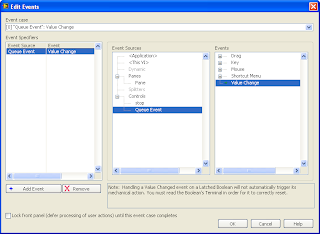
This new design addresses numerous problems with the previous version of the dialog.
What are your favorite new features of LabVIEW 2009?
As you probably know, we changed the version number scheme so this release is LabVIEW 2009.
To see the new features, you should check out ni.com/labview. There is a nice video (click "See what's new") that's in Flash, so you can easily navigate to sections that interest you.
One change that isn't big enough to be listed as a new feature (and that I happened to work on) is a revised Edit Events dialog for the event structure:

This new design addresses numerous problems with the previous version of the dialog.
- Grouping events in a tree structure helps keep the Event list browsable, and makes the commonly-used "Value Change" event visible without scrolling.
- The flow when using the dialog is left-to-right, which should be easier for new users to understand.
- The full label of the event case is visible instead of just the number.
- The "Lock front panel" text includes "defer processing" to give a better indication that locking does not discard user actions while the panel is locked.
What are your favorite new features of LabVIEW 2009?
posted by Christina at
7:42 AM


7 Comments:
"What are your favorite new features of LabVIEW 2009?"
Well, for me it's this one. Not because it's the best, but because I didn't notice it during the beta, so it surprised me when I saw it.
This dialog has certainly been long overdue in getting this treatment. Kudos for finally handling it.
I've just spent most the morning doing battle with this dialog in8.6.1 - I now have a smile back and want to upgrade just for this feature.
Great feature and I agree with Yair, it is long overdue and I appreciate the extra verbage in the Lock front panel text- I remember being stuck trying to figure this out.
Question- why not give the user the ability for each event to discard user actions while the panel is locked processing other events?
Very often, if not most all of the time I do not want the user to be able to start registering all sorts of other events while processing the current event.
I think that this would be a great feature and would allow me not to have to register/unregister events dynamically.
Thanks for the comments! I'm glad you like the changes.
Amiri, I'll pass your suggestion along to the developer who owns the event mechanism. Thanks!
Yes!!!
This really helps clean up event structures, and marketing should be shot for not including it as a new feature ;-)
A little suggestion for LabVIEW 2010: How about adding the ability to name event numbers so they can be organized into user sensible categories.
Carsten thomsen
To those making suggestions for LV 2010: Please post your ideas to ni.com/ideas. The Idea Exchange allows you to post ideas and vote for ideas that you want to see. It allows users to discuss the relative merits of various ideas. NI has committed to doing at least a couple of the top ideas for each release, and we'll use it as a guide for prioritizing work.
Love the redesign. The one thing I would add that would significantly aid my development would be that the most recently added controls appear at the top of the list, not the bottom.
This makes sense, because generally I add a new control, then add an event to handle it. In this scenario, I always have to scroll to the bottom of an increasingly long list! I very rarely end up configuring events on the "older" controls at the top of the list.
Post a Comment
<< Home